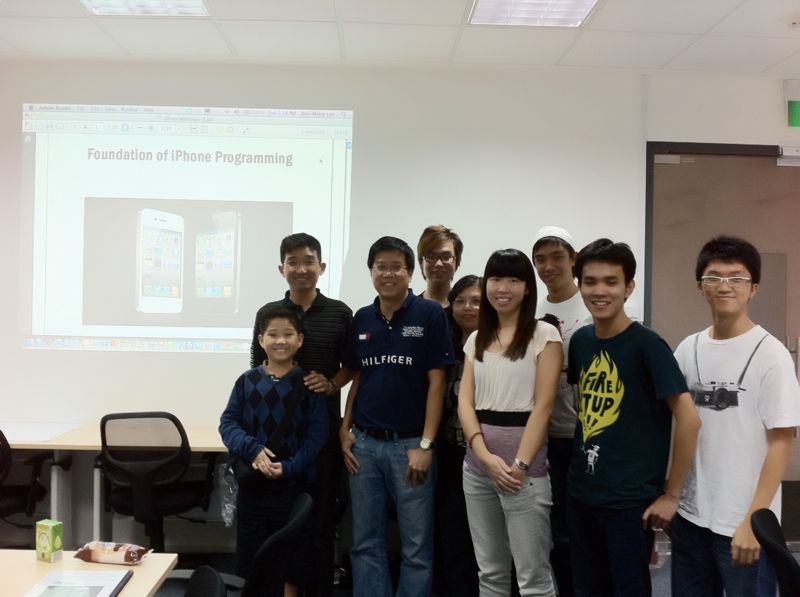
Come and join us in the upcoming Android Programming course on 19-20 Sep 2011. In this 2-day course, you will learn how to get jumpstarted with Android programming using Eclipse and the Android SDK in the shortest amount of time. This is a lab-intensive course that will have you up and running in just one morning! By the end of the day, you will be able to write your own Android apps and be like these guys.Learn2Develop is a technology company specializing in hands-on training on the latest Web and Mobile technologies.
Email: weimenglee@learn2develop.net
Wednesday, August 24, 2011
Android Programming - 19-20 Sep 2011
Come and join us in the upcoming Android Programming course on 19-20 Sep 2011. In this 2-day course, you will learn how to get jumpstarted with Android programming using Eclipse and the Android SDK in the shortest amount of time. This is a lab-intensive course that will have you up and running in just one morning! By the end of the day, you will be able to write your own Android apps and be like these guys.Sample Project by Android Course Participant - Converts between degrees of Latitude and Longitude and MGRS
In last week's Android class at Fort Gordon, I have an outstanding participant - Chiam Krause, who took some jar files from the World Wind JAVA SDK and put together a coordinate converter that converts between degrees of Latitude and Longitude and MGRS. He has kindly shared the source code of his project on bitbucket. The project name is GridSquare.Monday, August 22, 2011
Army moves to create mobile apps in pilot course

Saturday, August 20, 2011
Another Android app published by my course participants - Android Programming - US Aug 2011
This is the app for you.
- Features
* Show colors and # from fiber optic pair count.
* Show pair colors, binder colors, and 600 binder color from a pair count using 25 pair color code.
Thursday, August 18, 2011
Android apps in the Android Market from participants of my Android class in the US - Aug 2011


Internet/data connection is needed in order to obtain real-time rate.
Saturday, August 13, 2011
iOS Tutorial - Importing & Exporting Documents in iOS

One of the common tasks that an iOS developer has to do is to import or export documents from his iOS application. For example, suppose you are developing a document reader and you want to allow the user to import documents into your application so that it can be read offline. Also, your reader might also support the exporting of documents so that other applications can make use of the document.
In this article, I will walk you through the different techniques you can employ to allow documents to be imported or exported from your iOS application.
Friday, July 29, 2011
Schedule for iOS Programming Course and Android Programming Course in Sep and Oct 2011 (Singapore)
Quite a number of readers have asked about the schedule of iOS Programming Course and Android Programming Course (Singapore) in Sep and Oct, so here it is!Wednesday, July 27, 2011
Beginning Android Application Development now rank #1 in Amazon.com's Software Development category
My Beginning Android Application Development book is now ranked #1 in Amazon.com's Software Development category! iOS Chat Application using Bonjour
A number of readers have asked where can they find the Bonjour Chat application that was mentioned in my Beginning iOS 4 Application Development book by Wrox. It is part of the code download for the book. To download the source code, head over to here. Go to the Chapter for Bonjour and the project contains all the code for Bonjour chatting! Enjoy!
Tuesday, July 26, 2011
Android Article - Preserving User Preferences in Android Applications
Often you need to store personalized information for each user of your application. For example, your application may require users to logon to a secure server for authentication. In this case, the user needs to supply his credentials, such as a login name and a password. The first time the user uses your application this information will be entered by the user, but subsequently it would be useful for your application to “remember” this information somewhere so that it can save the user the trouble of entering the same information every time he uses your application. To save this information, there are a couple of ways you could use – files, databases, etc. However, a much better way would be to use the SharedPreferences feature in Android. In this article, I will walk you through the steps to creating an Android application that makes use of this SharedPreferences feature.
Sunday, July 24, 2011
Foundation of iPhone Programming - 21-22 July 2011
Friday, July 08, 2011
Objective-C Memory Management Tip 1 - Remember to retain item(s) retrieved from an array
Tuesday, July 05, 2011
Learning Objective-C Programming (Singapore) - 19 July 2011
One of the hurdles that most developers encounter when starting out on iOS development is the language - Objective-C. While Objective-C is an extension of the C Programming language, its syntax left most of the developers who are deeply entrenched in Java and C# very confused. In addition, Objective-C in iOS requires developers to manage their own memory usage carefully so that memory is utilized efficiently. In fact, a little mistake in deallocating objects in Objective-C is enough to make your application spiralling out of control. It is with this intention that I am launching this new course on Objective-C programming. Monday, July 04, 2011
My new eBook published - Building Applications for the Mac App Store
My new eBook has just been released at Wrox.com - "Building Applications for the Mac App Store". Here is a brief synopsis of the book:Sunday, July 03, 2011
Inaugural weekend iPhone class - 2-3 July 2011
iPhone and Android course for July 2011 (Singapore)
Here is the schedule for iPhone and Android courses (Singapore) for the month of July 2011:Monday, June 27, 2011
iOS and Android World Tour coming to Atlanta in Sep 2011

Wednesday, June 22, 2011
iOS and Android World Tour coming to Vancouver in Oct 2011

Tuesday, June 14, 2011
Bluetooth Tennis Ball Example (DevTeach) available for download
Thursday, June 09, 2011
Weekend Class - Foundation of iPhone Programming - 2-3 July 2011
There will be a special run of the Foundation of iPhone Programming (S$997 nett) on the weekend of 2-3 July 2011 (9am to 5pm). Venue is Mountbatten Square. Lunch provided.Last call for iOS and Android courses in June 2011
This is the final call for all participants interested in enrolling for the iOS and Android courses in June 2011. Friday, May 27, 2011
Mobile Programming Courses in June 2011 - iPhone, Android, and Windows Phone 7
Here are the courses running in June 2011. If you have not registered for them yet, do so now as seats are running out. Wednesday, May 25, 2011
Come and join me in my talks at DevTeach - May 30 - June 3 2011
I will be presenting 2 sessions at DevTeach 2011 (Canada). The 2 sessions are:San Francisco - Android and iPhone Bootcamp
Friday, May 20, 2011
Weekend class - Foundation of iPhone Programming - 28-29 May 2011
There will be a special run of the Foundation of iPhone Programming (S$997 nett) next weekend - 28-29 May 2011 (9am to 5pm). Venue is Mountbatten Square. Lunch provided.iOS Bluetooth Programming - Getting devices to see each other
- (GKSession *)peerPickerController:(GKPeerPickerController *)pickerIn this case, devices can only see each other if their session ID are the same. The displayName argument allows you to specify the name of the device that will be seen by the other party. If you set it to nil, iOS will use the device's name.
sessionForConnectionType:(GKPeerPickerConnectionType)type {
if (!self.currentSession) {
self.currentSession = [[[GKSession alloc] initWithSessionID:@"Session_ID_Here" displayName:nil sessionMode:GKSessionModePeer] autorelease];
self.currentSession.delegate = self;
}
return self.currentSession;
}
Wednesday, May 18, 2011
Coming soon - Beginning Android Tablet Application Development (Wrox)
If you are fascinated with the many Android tablets in the market and wanted to write an application or two for these devices, check out my latest book that is coming your way soon in August. This book is geared towards those beginning developers who wanted to start writing Android tablet apps first. This book will get you started in no time. How to change the Base SDK of your iOS Project
In the past, when you create your iOS project, Xcode will always hardcode the version number of the SDK in your project.
If you open the project using a newer version of the SDK, you will get the Base SDK Missing error:
To resolve this, simply double-click on the project name (in this example, BasicUI) to open the Info window. In the Info window, select the General tab:
At the bottom of the Info window, select the drop down for Base SDK for All Configurations and select Latest iOS (iOS 4.3). Once this is selected, close the Info window.
Back in Xcode, you should see the SDK number that was selected earlier:
If you don’t see this, close the project and reopen it again. This time, the updated version number should appear.
Friday, May 13, 2011
Android Tip - How to intercept SMS messages and prevent them from appearing in the Messaging App?
Ever since, I have received numerous questions on how you can prevent the incoming messages (that you are trying to intercept) from appearing in the Messaging application (and hence in the status bar). The solution to this is pretty straight-forward once you understand the concept of broadcast receivers.
<receiver android:name=".SMSReceiver">
<intent-filter>
<action android:name="android.provider.Telephony.SMS_RECEIVED" />
</intent-filter>
</receiver>
When a SMS message is received, all applications (including the Messaging application) will take turn to handle the incoming message. So, in order to prevent the incoming message from being handled by the Messaging application, your application just needs to handle the message before the Messaging app has the chance to do so. To do this, add the android:priority attribute to the <intent-filter> element, like this:
<receiver android:name=".SMSReceiver">
<intent-filter android:priority="100">
<action android:name="android.provider.Telephony.SMS_RECEIVED" />
</intent-filter>
</receiver>
Set this to a high number, such as 100. The higher the number, the earlier Android executes your application. So in this case, when an incoming message is received, your application will execute first, and you can decide what to do with the message. To prevent other applications from seeing the message, simply call the abortBroadcast() method in your broadcast receiver class (SMSReceiver):this.abortBroadcast();Once you do this, no other applications will see your SMS message. :-) Have fun!