Showing posts with label bluetooth. Show all posts

Monday, May 02, 2016

iOS Boot Camp

If your company is planning to go into iOS development, the 5-Day iOS Boot Camp is the most cost-effective way to get your developers jumpstarted. Available in Swift or Objective-C, this course focuses on all the important aspects of iOS development to jumpstart your developers in the shortest time.  We can conduct this course in house, or you can send your developers to our open classes.

Topics include:

  • Introduction to Objective-C or Swift
  • Storyboard
  • Location-Based Services
  • Design Patterns
  • Protocols and Delegates
  • Databases
  • Web Services
  • Background Fetch
  • Network Connectivity

We have conducted this course successfully worldwide. Contact Wei-Meng Lee @ weimenglee@learn2develop.net for details such as costing, venue, as well as in-house arrangements.

Monday, January 12, 2015

Developing a Selfie Remote-Control App in iOS Using Bluetooth Low Energy


Wei-Meng Lee speeds through the easy setup of a remote-control app employing Bluetooth LEs on Apple's iOS. Using an inexpensive TI SensorTag for remote control, you can prompt your gadget remotely to perform a variety of tasks. Here, you'll learn how to set up your device and system to take 'selfie' photographs, even when you're nowhere near your iPhone.
Bluetooth Low Energy (Bluetooth LE) is getting a lot of attention lately due to its support in various devices and gadgets. Thanks in no small part to the advent of the IoT (Internet of Things), Bluetooth LE is poised to change the way you build applications that interact with external devices and gadgets. Although Bluetooth LE is just starting to get developers' interest, Apple actually had support for Bluetooth LE very early on, starting from the iPhone 4S.
In this article, rather than walk you through the details of Bluetooth LE programming, I'll show you how to build a selfie remote-control app quickly, using the Bluetooth LE APIs in iOS 6 and later, with a cheap $25 device for the remote control.
Want to learn more about Bluetooth Low Energy using iOS? Come and join us in the next run of the IOS301 - Advanced iOS - Programming Bluetooth Low Energy course:
Course Fee
S$699 (nett; no GST)
Schedules
Start DateEnd DateDetailsCategory
Fri Jan 02 2015Fri Jan 02 2015PDF
Thu Mar 12 2015Thu Mar 12 2015PDF
Wed Apr 08 2015Wed Apr 08 2015PDF
Venue
Bayview Hotel Singapore
30 Bencoolen Street
Singapore 189621  

Thursday, July 24, 2014

AND303 - Android Bluetooth Low Energy Programming

Come and join us in this course on Bluetooth Low Energy (BLE) programming on Android. You will learn how to connect to BLE devices so that you can retrieve information like temperature, gyroscope readings, bearings, etc. You will also learn how to scan for iBeacons, an Apple technology that provides location services.

Best of all, you will get a Ti SensorTag for this course, which you can bring home after the course.

Venue
Bayview Hotel

Fee
S$699 (nett; no GST)
* Includes lunch and 2 tea-breaks

Date
11 Sep 2014 (Thu)

Time
9am to 5pm

Prerequisites
Basic knowledge of programming

Course Outline and Application Form
Download here.

Saturday, April 12, 2014

List of Courses for June 2014

I am pleased to launch a couple of new courses this coming June. Check out the list below and more details will be released in the coming days:

16-17 June 2014 (Mon-Tue) - PEB101Foundation of Pebble Programming - $1,295

18 June 2014 (Wed) - AND303Advanced Android - Bluetooth Low Energy Programming - $699

19-20 June 2014 (Thu-Fri) - IOS101 - Foundation of iPhone 
Programming - $1,097


21-22 June 2014 (Sat-Sun) - AND001Developing Android Applications using App Inventor - $1,195

24 June 2014 (Tue) - AND305 - Advanced Android - Developing Android User Interfaces - $699

25-26 June 2014 (Wed-Thu) - AND101Foundation of Android 
Programming - $1,097

27 June 2014 (Fri) - AND304Advanced Android - Android Wear Programming  - $699

Venue
Bayview Hotel Singapore
30 Bencoolen Street
Singapore 189621
9am to 5pm

Monday, March 31, 2014

iOS and Android Training in Latvia

This coming May/June I will be running a series of courses in Latvia while I am there for the DevConFu conference. If you have always wanted to get started in iOS or Android programming (or both!), this is your best chance to get jumpstarted in the shortest amount of time!

Pre-Conference
Foundation of Android Programming 26 May 2014
Foundation of iOS Programming 27 May 2014

DevConFu
DevConFu workshop: Foundation of Pebble Programming 28 May 2014

Post-Conference
Advanced Android – Bluetooth Low Energy Programming 2 June 2014
Advanced iOS – Programming iBeacon in iOS7 using Bluetooth Low Energy 3 June 2014


Thursday, January 02, 2014

Bluetooth Low Energy Programming - iOS and Android

For those of you who are into Bluetooth Low Energy programming, there are two courses coming up this month:

* 22 Jan 2014 - AND303 – Advanced Android – Bluetooth Low Energy Programming
* 29 Jan 2014 - IOS301 – Advanced iOS – Programming iBeacon in iOS 7 using Bluetooth Low Energy

Both courses will focus on the following topics:
    * How to connect to BLE devices (such as Heart Rate Monitor, Temperature Sensors, Keyfobs, etc)
    * How to read and write to characteristics on the BLE devices
    * How to use iBeacons for Location-Based Services
    * How to scan for iBeacons
Participants will get a unit of the Ti SensorTag. The Ti SensorTag is a Bluetooth Low Energy (CC2541) device containing 6 sensors:

    * temperature
    * humidity
    * pressure
    * accelerometer
    * gyroscope
    * magnetometer


Venue
Bayview Hotel Singapore
30 Bencoolen Street 
Singapore 189621
9am to 5pm

Thursday, December 05, 2013

Android Tip - Transferring File via Bluetooth

If you want to easily transfer a file from your application to another Android device, you can make use of Bluetooth.

Beginning with Android 4.1, you can now make use of the built-in Bluetooth Sharing app available on the device. The following code snippet shows how to use an Intent object to manually invoke the Bluetooth Sharing app to send an image from one device to another:

import java.io.File;
import android.content.ComponentName;
import android.content.Intent;
import android.net.Uri;
import android.os.Environment;

...

        
        //---assuming you have a file named MyPhoto.jpg in
        // your SD card---
        File file = new File(
            Environment.getExternalStorageDirectory().
            getPath() + "/MyPhoto.jpg");
        Intent i = new
            Intent(android.content.Intent.ACTION_SEND);
        i.setType("image/*");
        i.setComponent(
            new ComponentName("com.android.bluetooth",                         
   "com.android.bluetooth.opp.BluetoothOppLauncherActivity"));
        i.putExtra(Intent.EXTRA_STREAM, Uri.fromFile(file));
        startActivity(i);      

    }

Tuesday, October 08, 2013

IOS301 – 1-Day Advanced iOS – Programming iBeacon in iOS7 using Bluetooth Low Energy

In recent years, we have seen a proliferation of Bluetooth Low Energy (Bluetooth LE) devices. Bluetooth LE, as it name implies, uses low energy for transmitting data.  This is very useful for devices that require long-battery life, such as heart rate monitor, temperature sensors, etc.  In iOS, Bluetooth LE functionalities are encapsulated in the Core Bluetooth Framework. Using the Core Bluetooth Framework, you can now write Bluetooth-enabled iOS applications that are able to communicate with Bluetooth LE devices. 


In iOS 7, Apple has taken Bluetooth LE one step further with the introduction of iBeacon. iBeacons are physical devices that use Bluetooth LE to continuously transmit its location.  When an iBeacon-enabled iOS application detects the presence of an iBeacon, the application will be sent a notification. Using the data transmitted by the iBeacons, the application can calculate the distance the user is away from the iBeacon. This is very useful for building location-based services that targets the insides of a building (such as malls and hospitals), where traditional location-based techniques are not quite adequate in knowing which floor a user is at. 
Topics
What is Bluetooth Low Energy (Bluetooth LE)
Introduction to the Core Bluetooth Framework
Players in Core Bluetooth
        o Central and Peripherals
        o Services and Characteristics
Simulating Peripherals using your iOS device
Communicating with Bluetooth LE sensors
What is iBeacon
Building your own iBeacon
Detecting iBeacons
Building Location Based Services applications using iBeacon

At the end of the course, you will learn:
How to communicate with Bluetooth Low Energy devices (such as temperature sensors and heart rate monitors) from your iOS applications.
How to build location-aware applications using iBeacon.
Prerequisites 
Attended the Foundation of iPhone Programming course
Mac running Mac OS X Mountain Lion (10.8.5) or later
iPhone/iPod touch/iPad (required)
Xcode 5 or later

Course Fee
S$699 (nett; No GST)

Download course outline and application here.

Dates
8 Nov 2013 (Fri)
13 Dec 2013 (Fri)

Venue
Bayview Hotel Singapore
30 Bencoolen Street 
Singapore 189621

Thursday, July 11, 2013

Course Highlight - Windows Phone 8


While Microsoft may not be winning the smartphone platform war today, it is slowly making inroads into the various markets previously dominated by iPhone and Android. Today's biggest news - Russia's largest wireless carrier has just dropped support for iPhone in favor of Windows Phone.

Inline image 1
In the smartphone war, apps play a pivotal role in determining the success or failure of a platform. While the quantity and quality of the apps in the Windows Phone Store are still no match to its competitors, it is slowly but surely attracting top app makers into making apps for it. Just this week, Viber has updated its Windows Phone app that is specifically designed for Windows Phone devices

Good News for Windows Phone Developers (or wannabe)!
For a limited time, the annual subscription fee for a Windows Phone Dev Center account has been reduced to $19 USD (or the equivalent in your local currency). Taxes, VAT, and other fees are excluded from this offer. This offer is valid beginning 6/26/2013 12:00 AM PST and ending 8/27/2013 12:00 AM PST in countries where the Windows Phone Dev Center registration is available (see Regional info). See the official terms of this offer for more details.

In Singapore, the reduced fee is now S$30. Go and register now!

Confirmed Windows Phone 8 Programming Courses This Month
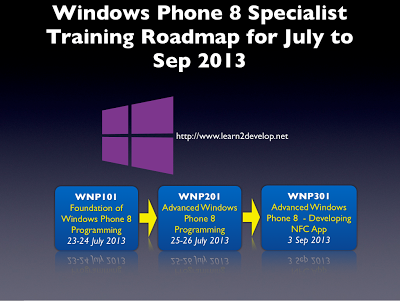
In July, we have two confirmed courses for Windows Phone 8 development - Foundation of Windows Phone 8 Programming, and Advanced Windows Phone 8 Programming. In Sep, we have a brand new course on Windows Phone 8 NFC Programming. So, brush the dust off your Windows laptop and start your engine! 

Inline image 1

In the Foundation course, you will learn the basics of writing Windows Phone app - User Interfaces, choosers and launchers, states of an application, location-based services, file storage, web services, databases, maps, and more. 

In the Advanced course, you will dive deeper into the more advanced areas of Windows Phone programming - background agents, Bluetooth and sockets programming, security, push notifications, and more.

Windows Phone Challenge - Lumia 920 and Lumia 925
Microsoft Singapore and Nokia Singapore are teaming up for the next Windows Phone Challenge! All you need to do is to implement one (or more) of the challenges posted here and you will be able to win some cool Nokia Lumia devices. The challenges are applications based very much on the local (Singapore) context. This is a great idea for student projects and is a good time to put your knowledge to the test.

Inline image 2

Saturday, June 01, 2013

Android Tip: Programmatically Displaying the Settings Page


Many a times, you need to programmatically redirect the user to the Settings page so that they can turn on certain features on the device before your application can work correctly For example, if your app uses Bluetooth and the Bluetooth radio is not turned on, you may want to programmatically display the Bluetooth settings page so that the user can turn it on.

Solution

To display the Settings page programmatically, you can use the startActivity() method together with an Intent object. The following shows some examples:

    //---display the main Settings page---
    startActivity(
        new Intent(Settings.ACTION_SETTINGS));
        
    //---display the Location access settings page---
    startActivity(new Intent(
        Settings.ACTION_LOCATION_SOURCE_SETTINGS));
                
    //---display the Wireless & networks settings page---
    startActivity(new Intent(
        Settings.ACTION_AIRPLANE_MODE_SETTINGS));
        
    //---display the Bluetooth settings page---
    startActivity(new Intent(
        Settings.ACTION_BLUETOOTH_SETTINGS));
        
        In general, you use the predefined constant Settings.ACTION__SETTINGS. The full list can be found here: http://developer.android.com/reference/android/provider/Settings.html